
Here is a clear and professional guideline for the NUESA Freshers’ Award Contest voting process. This is designed to be shared with the students of the Faculty of Engineering to ensure a smooth voting experience.
Official Voting Guidelines: NUESA Freshers’ Award Contest
Welcome to the R.I.C.H Mandate Freshers’ Awards. Follow the steps below to support your favorite nominees and ensure your votes are counted correctly.
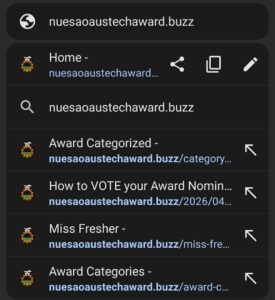
Step 1: Access the Voting Portal
- Open your mobile or desktop browser.
- Type the official URL: nuesaoaustechaward.buzz into your address bar.
- Once the homepage loads, you will see the NUESA Freshers’ Awards branding and a “Vote Now” button.

Step 2: Browse Award Categories
Navigate through the menu to view the different categories available for this year’s contest, including:

- Mr. & Miss Fresher
- Most Sophisticated (Male & Female)
- Most Popular (Male & Female)
- …and more.
Step 3: Select Your Nominee

- Click on the specific category you are interested in.
- Scroll through the list of nominees to find your preferred candidate (e.g., Funmi Demilade for Miss Fresher).
- Review the current vote count displayed under the nominee’s profile.
- Click the green “Vote Now” button located directly beneath their name.

Step 4: Configure Your Vote
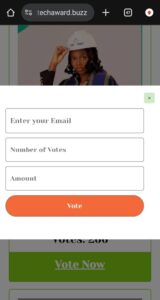
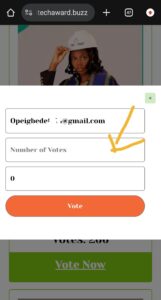
- A pop-up window will appear requiring the following information:
- Email Address: Enter a valid email (e.g., yourname@gmail.com).
- Number of Votes: Input the total number of votes you wish to cast.
- Amount: The system will automatically calculate the total cost based on the number of votes entered (e.g., 50 votes = ₦2,500).
- Click the orange “Vote” button to proceed to payment.
Step 5: Secure Payment (Paystack)
You will be redirected to the secure Paystack Checkout page. Choose your preferred payment method:
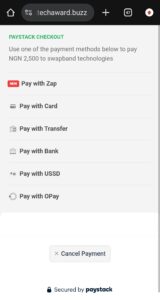
- Pay with Card (Mastercard, Visa, Verve)
- Pay with Transfer
- Pay with USSD
- Pay with OPay
Note: Payments are processed by Paystack and flutterwave.
Step 6: Confirmation
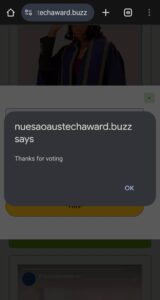
- Once the transaction is successful, a confirmation dialogue box will appear saying: “nuesaoaustechaward.buzz says: Thanks for voting.”
- Click “OK” to return to the site. Your votes will be automatically added to the nominee’s total.